Watch your pattern play
in grid or notation view.
Live playback shows every hit as it happens. Grid view for production, notation view for reading. Sticking overlays tell you which hand plays each note.
Two ways to follow along
Grid view
Cells light up in real time as the pattern plays. See kick, snare, hi-hat, and cymbals firing together. Color-coded velocity (ghost, normal, accent).
Notation view
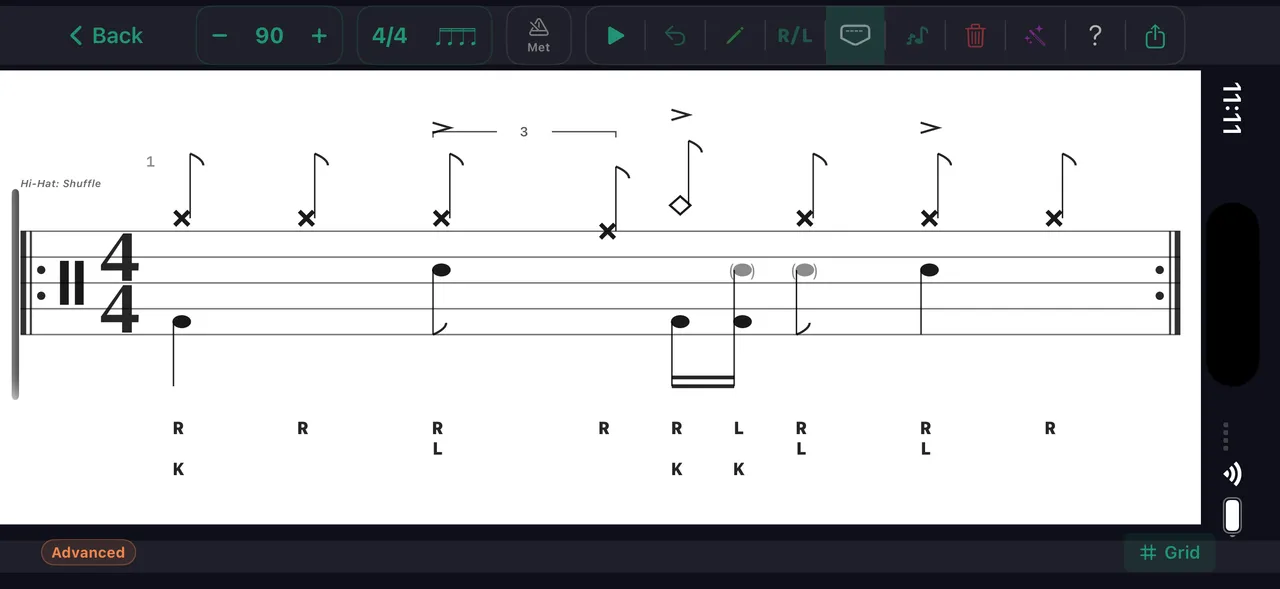
Standard drum notation with a moving playhead. Read the pattern like sheet music while it plays.
How live playback works
During playback, the pattern loops continuously while a playhead scrubs across the display. In grid view, cells light up as each voice fires — kick, snare, hi-hat, cymbals, toms. You see the entire bar laid out horizontally with every voice on its own row, every subdivision in its own column. The playhead moves left to right, highlighting the current position.
In notation view, the same pattern renders as standard drum staff notation. The playhead moves through the score, highlighting the current beat. If you're learning to read drum notation, this is the most effective way — you see the symbol and hear the sound simultaneously. Toggle between grid and notation at any time during playback.
Sticking labels (R and L) appear above each note in both views, showing which hand plays which hit. This connects the visual pattern to the physical motion. For left-handed players, the stickings automatically mirror — no mental translation needed.
What the notation view draws — this figure comes from the same engine: hats R, backbeats L, kicks K, and a ghost note in parentheses with its lowercase l.
Overlays that teach
Sticking overlay
See R and L above every hit — lowercase r and l on ghost notes, so the dynamics read at a glance. Know which hand plays which note before you sit down at the kit.
Counting labels
Toggle counting syllables above the staff (1 e & a, triplets '1 trip let', sextuplets) in the editor, live playback, and video and image exports, and a spoken count-in sets the pulse before the pattern starts.
Loop control
Loop the pattern at any tempo. Slow it down, speed it up, repeat until it's locked in.
Every drummer needs
a home base.
See it. Hear it. Play it.