Build it. Share it.
They drill it.
Pattern Editor for any exercise, up to 64 bars. Engraved sheet-music PDFs for handouts, with sticking and counts set bar by bar. Share-link for homework. Follow your students and their completed drills show up in your Activity feed. The lesson tool drum teachers have been building in their head.
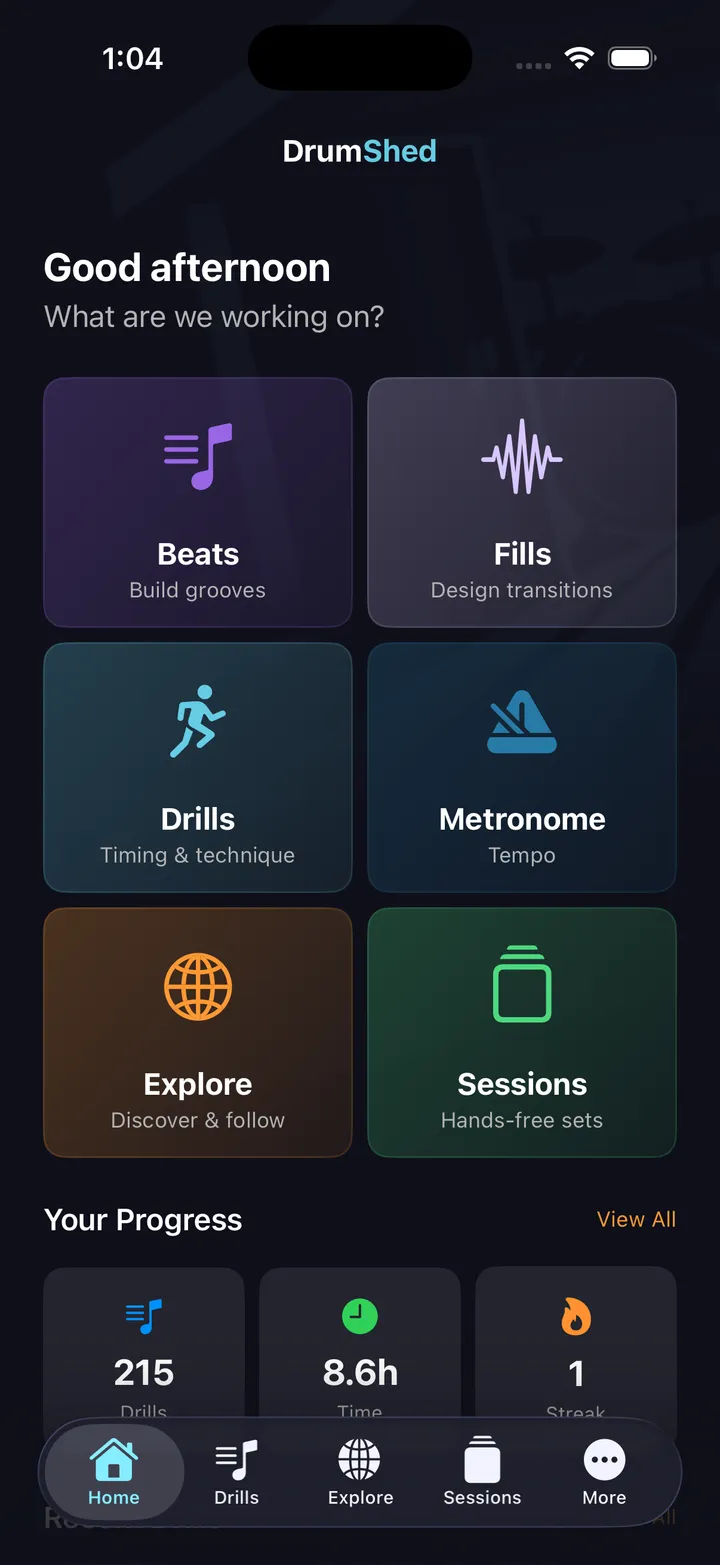
DrumShed for Teachers
Everything on this page works today. A teacher companion is coming on top of it — a real roster, assignments with due dates, and what each student actually practiced. Founding Teachers get in first, at a rate that stays.
Lesson prep, without the prep tax.
Most drum lessons live in a teacher's head — patterns scribbled on napkins, photocopied books, "play this exercise from page 47." DrumShed turns lesson prep into a system you can ship to a student in two minutes.
Build any exercise
Pattern Editor with cell-by-cell control. Every voice, every subdivision, every accent. The exercise is what you mean it to be.
Send it instantly
Share-link opens straight into the app on the student's phone — or hand them the engraved PDF for the music stand. Same exercise, both formats.
See the practice
Follow your student — every drill and session they complete shows up in your Activity feed. The next lesson starts with what they actually ran.
From idea to shared drill
Four steps. Two minutes. The student gets to work the same evening.
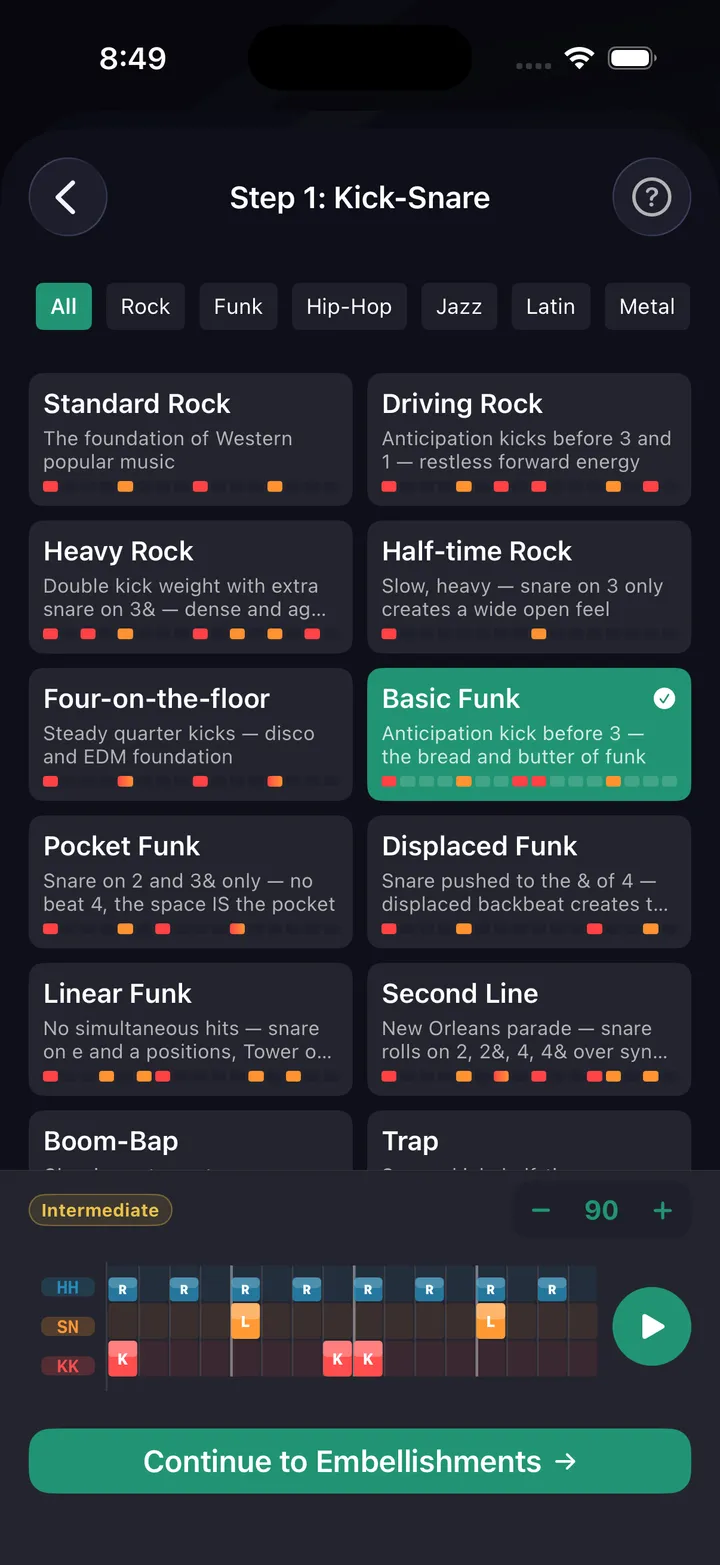
Build the exercise
Pattern Editor gives you cell-by-cell control: every voice, every subdivision, every accent, every flam. Or hand-build with the wizard for grooves, fills, or rudiments. The exercise is exactly what you intend.
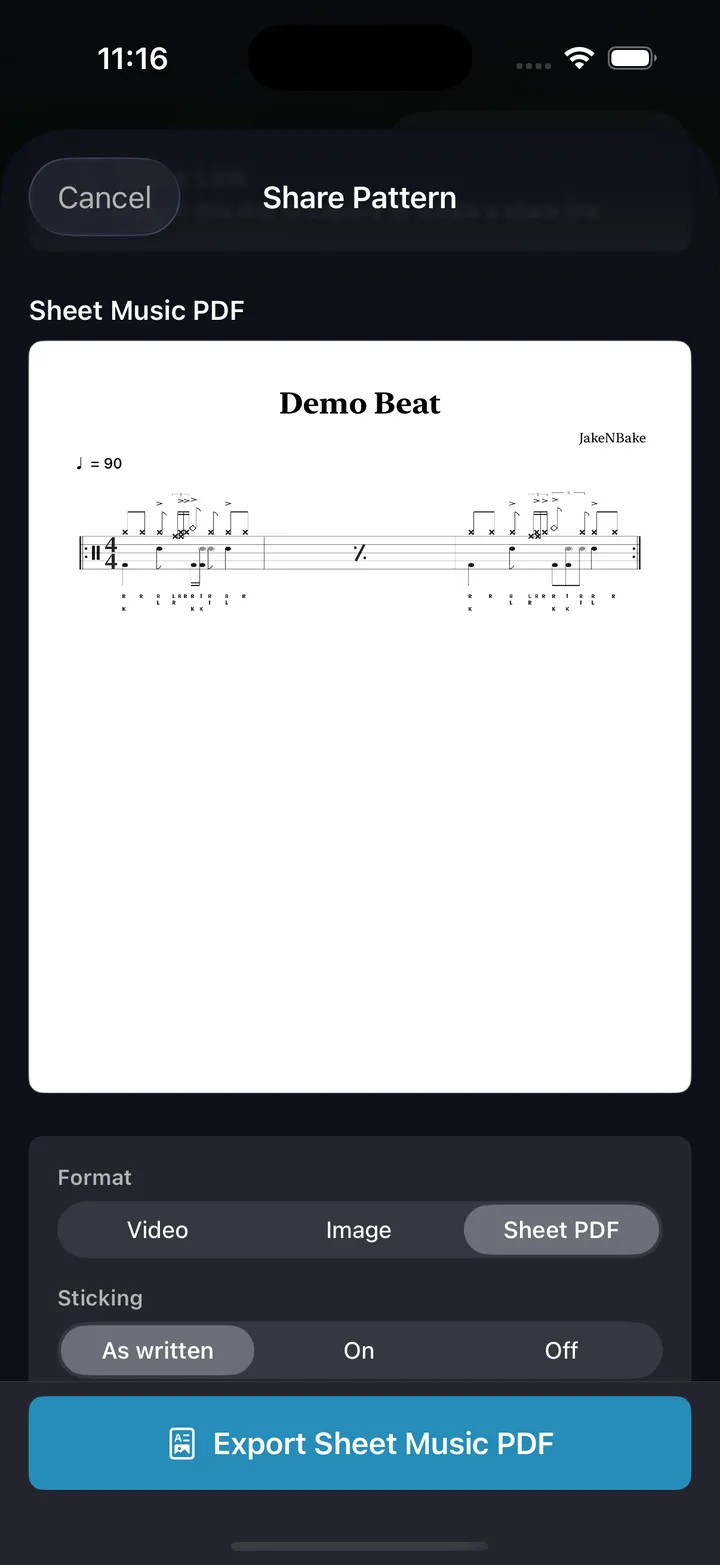
Print it as a worksheet
Export the exercise as an engraved sheet-music PDF — A4, title and tempo at the top, up to four bars per system, as many pages as it takes. Choose bar by bar which bars show sticking and which show the counts. Notation PNGs and video exports sit alongside it for the student who learns by watching.
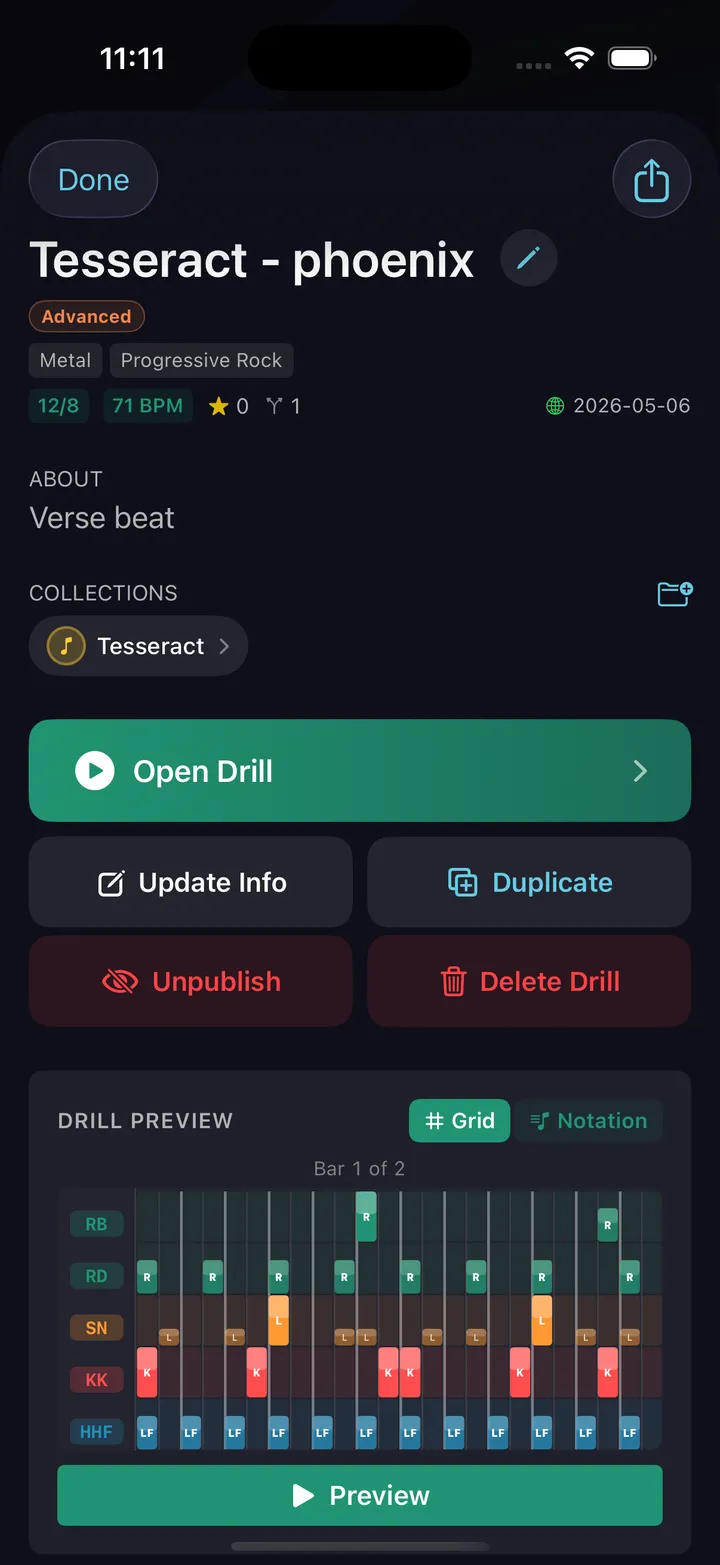
Share with a link — and a video
One tap publishes to Explore. Attach a YouTube link of yourself playing it (or a reference recording) so the student has something to aim for. The link opens straight into the app on their device.
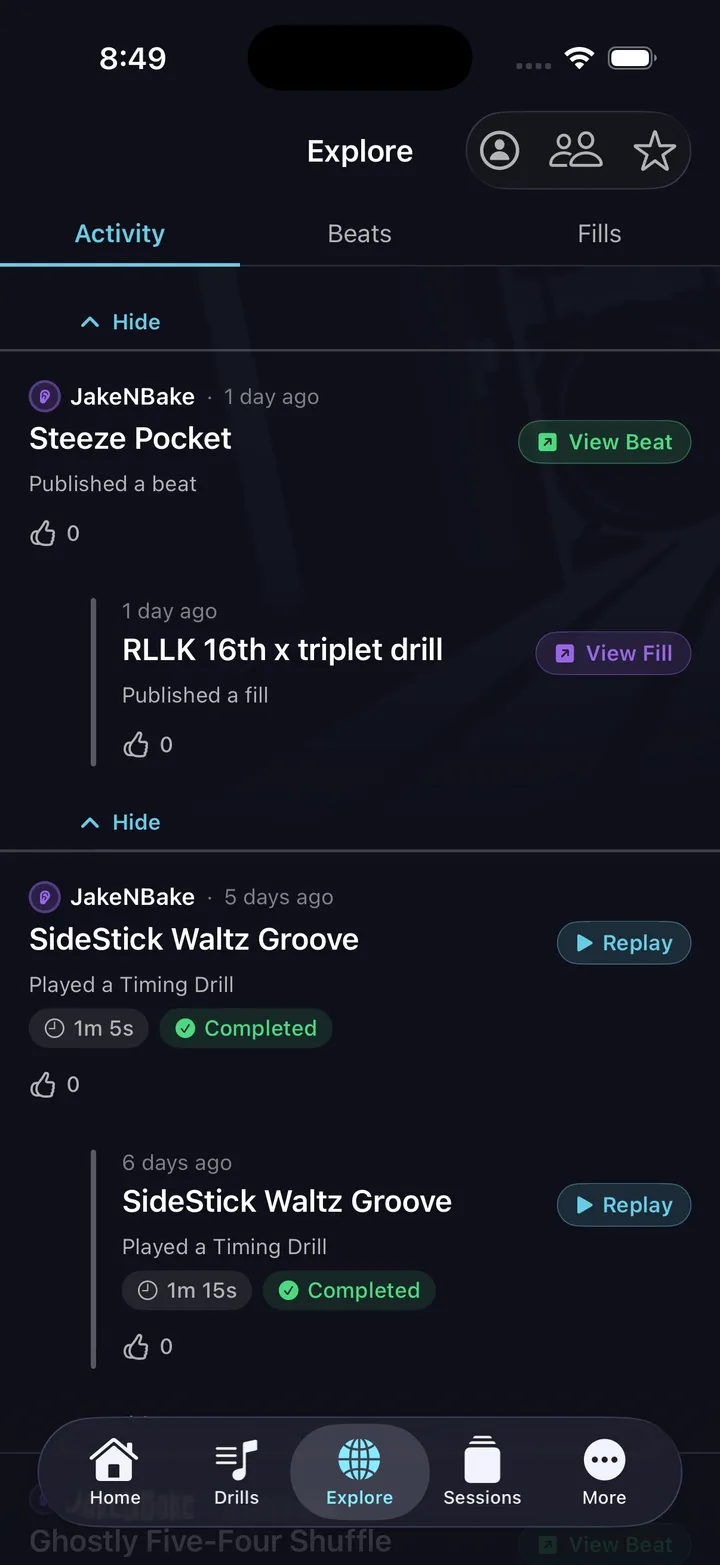
They drill at home
Follow your student, and every drill and session they complete shows up in your Activity feed — which drill, how long, what tempo. The next lesson starts with what they actually ran, not "did you do your homework?"
Eight ways teachers use DrumShed
Eight things teachers build on a Monday and send the same afternoon.
Targeted homework
Student dragging on the e-and? Build a 5-minute drill that puts the click on the e for an entire bar. Send it. When they run it, it shows up in your Activity feed.
A practice path between lessons
Build a multi-day practice path — day-by-day material with tempos and durations — and share it with one link. Your student enrolls on the days they practice and follows a real calendar; only you can edit the plan.
Sight-reading practice
Export the exercise as an engraved sheet-music PDF and print it. The student reads the chart on the stand while the same pattern plays back on their phone.
One exercise, two worksheets
Sticking letters and counting captions are set per bar. Counts on bar one for the beginner, nothing on the sheet for the student who has had it three weeks — without rewriting the exercise.
Independence drills
Pattern Editor lets you isolate the exact independence problem — like a steady ride pattern with a syncopated kick. Build it once, send it to every student who hits the same wall.
Accountability + streaks
Streaks turn home practice into a habit your student wants to maintain. Achievements give them visible wins between lessons.
Rudiments curriculum
36,700+ stickings means you can program singles, doubles, paradiddles, six-strokes, and flam rudiments — and route them across the kit.
Reference videos
Attach a YouTube link to any pattern you share. Could be you playing it, could be the song the groove came from. The reference travels with the drill.
Surgical control over every hit.
Place every cell by hand. Adjust velocity per beat. Set the sticking. Add flams or accents to individual hits. Configure subdivisions, time signatures, polymeters.
The Pattern Editor is the same surface drum-book authors would build their exercises on — except the result prints as engraved sheet music and stays playable. The chart and the pattern are the same object.
- 24 drum voices — kick, snare, side stick, rim clicks, open/closed/pedal hats, three toms, ride (bow, bell, crash), crash, china and splash each with their choke, cowbell
- 11 voice strategies for hand distribution
- 18 accent shapes (gospel chops, descending runs, crescendos)
- Per-hit flam control
- Polyrhythm support — 8 preset ratios, 3:2 through 5:4
- Any time signature from 2 to 13 over /4 or /8, plus mixed meters and per-beat subdivisions
- Exercises up to 64 bars, laid out as bar cards you can drag, duplicate, and delete
- Sticking letters and counting captions switched on or off one bar at a time
The week between lessons
The lesson is the easy part. The other six days are where students stall — not because they lack discipline, but because "practice this" is an instruction with no shape. They sit down, play the thing they can already play, and arrive next week roughly where they left off.
A practice path is how you give that week a shape. Lay out the days: isolation first, then the tempo climbing a little at a time, then the same hands applied inside a real groove. Each day carries its own tempo and duration, so you can pace a beginner differently from the student who has had it three weeks — from the same material. Share the path with one link and it lands on their practice days as real dates.
The self-check prompts on each day are doing the job you would do in the room: asking a specific, answerable question about the rep they just played, with the student calling the pass. That is a habit worth building even when you are not there — and when they come back, the Activity feed tells you which days they actually ran.
Drum teacher FAQ
Can I assign drum homework to my students?
Yes. Build the exercise in the Pattern Editor, then share it with a link that opens straight into the app on your student's phone. For work that spans a week or more, build a multi-day practice path instead — your student enrolls on the days they practice and follows a real calendar. Editing stays with you, so handing the same plan to ten students does not let one of them change it for everyone.
How do I know whether my student actually practiced?
Follow your student and every drill and session they complete appears in your Activity feed — which drill, how long, and at what tempo. The next lesson can start from what they actually ran instead of "did you do your homework?". The feed shows practice that happened — days, drills, tempos — and the judgment of how it went stays with you.
Can I print exercises for a music stand?
Yes. Any exercise exports as an engraved sheet-music PDF — A4, title and tempo at the top, up to four bars per system, as many pages as it takes. You choose bar by bar which bars display sticking letters and which display counting captions, so the same exercise can be printed as a beginner worksheet and an advanced one without rewriting it.
Do my students need a paid subscription?
No. Everything a student needs in order to practice is free: all ten timing drills, hands-free sessions, their own history and stats, and any drill or path plan you share with them. A subscription only covers making their own patterns — the Beat Maker and Fill Maker — plus publishing to Explore, enrolling in a path to follow it on a schedule, and the AI co-pilot ($5.99/month, or included for life with Founding Member). So a student can see exactly what you are asking of them, and run it, before anyone pays.
Is there a version of DrumShed built for teachers?
One is coming. Everything on this page works today with the app your students already use, and a teacher companion is in the works that adds a real roster, assignments with due dates, and a view of what each student actually practiced that week — instead of following students and reading the Activity feed. Founding Teachers get in first at a rate that stays locked in; the waitlist is at the bottom of this page.
Does DrumShed replace me as a teacher?
No, and it is not built to. It handles the parts that eat your prep time and the days between lessons: writing the exercise, printing the chart, sequencing the week, and showing you what got practiced. The teaching judgment stays with you.
What kinds of exercises can I build?
Anything you can notate for a kit: 24 drum voices, per-hit accents and flams, velocity per beat, sticking, polyrhythms, mixed meters, and per-beat subdivisions, across exercises up to 64 bars. Independence drills, rudiment routings, sight-reading charts, and groove studies are all the same tool — you place the cells and the result is both a printable chart and a playable pattern.
Can I attach a video of myself playing the exercise?
Yes. Connect your YouTube channel and you can attach one of your own uploads to any pattern you publish, so the student has a reference to aim for. The video travels with the drill — they see what it should sound like alongside the notation.
Can I use DrumShed with online students?
Yes — everything travels by link, so nothing depends on being in the same room. Send the drill or the path, they open it on their own device, and their completed practice shows up in your Activity feed before the next lesson.
Be a Founding Teacher
The teacher dashboard opens with the founding cohort. Leave your email and you’ll be first through the door — at the Founding Teacher rate, locked in for as long as you keep it.
One email when it opens. Nothing else. See the full teacher preview.
Every drummer needs
a home base.
Build your first lesson today.